

有些厂商Windows系统盘会比Linux系统盘大,想要大一点系统盘. 例如: AZURE, AWS等.
有些厂商不支持VNC,这对于转换系统实在不方便.
这篇文章可以解决以上问题.
Windows to Linux!
使用前,请耐心看完文章.
如果造成损失,萌咖不负任何责任.
- 更新日志
- 2018.11.02
- 使用方法:
- 下载 win32loader.bat .
- 双击打开此文件.
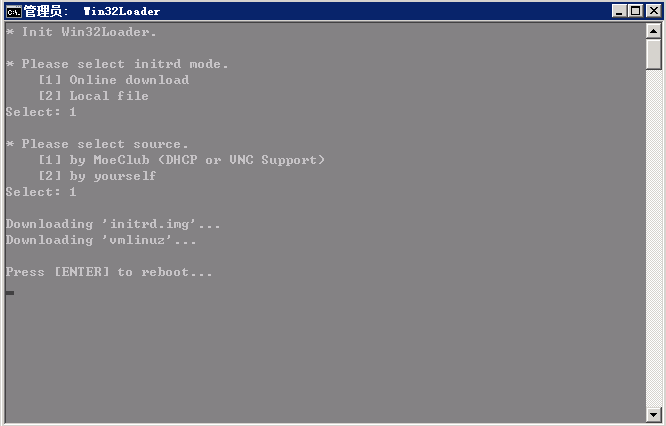
- 自行选择选项.
- 按回车重启,并等待安装完成.
- 注意事项:
- 如果对提供安装的发行版不满意,请参考此文章.
- 如需要Linux一键重装为Windows,请参考此文章.
- 如果厂商不支持VNC,则需要自己定制镜像.
- 如果厂商支持VNC,则可以直选全部选 1 .
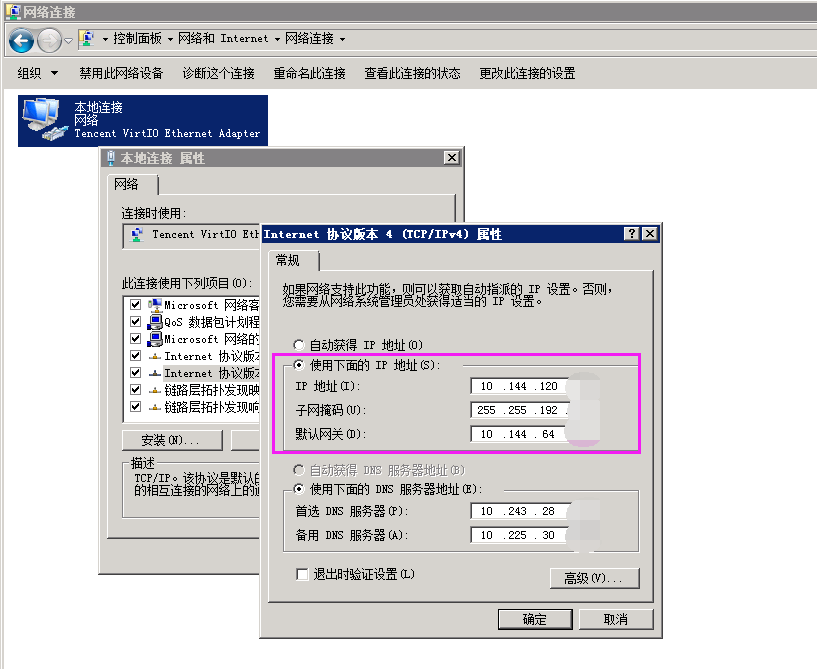
- 区分是否为DHCP模式
- 非DHCP模式: 如上图,显示了详细的IP地址.(选中:使用下面的IP地址)
- DHCP模式: 参考上图.(选中:自动获得IP地址)
- win32loader.bat:
增加 SHA1 文件校验, 避免下载中意外出错.
[ Linux VPS ] Debian/Ubuntu/CentOS 网络安装/重装系统/纯净安装 一键脚本
默认提供的是Debian8(Jessie),添加了firmware包,提供了更多的驱动支持,DHCP模式一键.
非DHCP模式,如果要一键,则需要自己定制镜像.
定制Debian系镜像应该没问题,其他未作测试.
默认root账户密码 Vicer .
[ Linux VPS ] Debian/Ubuntu/CentOS 网络安装/重装系统/纯净安装 一键脚本
定制方法参考上面提到的文章
[ Linux VPS ] Debian/Ubuntu/CentOS 网络安装/重装系统/纯净安装 一键脚本
主要在镜像中添加机器的网络参数,以便支持一键安装.
命令示例:
1 2 3 4 | # 定制带网络参数的initrd.img
bash InstallNET.sh -d 8 -v 64 -a --ip-addr <IP> --ip-mask <NetMask> --ip-gate <GATE> --loader
# 需要dd安装其他系统(例如 Windows to Windows),定制命令.(网络参数有DHCP的,无需添加.)
bash InstallNET.sh -dd <IMAGE_URL.tar> --ip-addr <IP> --ip-mask <NetMask> --ip-gate <GATE> --loader
|
完成后将 initrd.img 和 vmlinuz 存放到能直链下载的位置.
安装的时候,自己填 IP地址,子网掩码, 网关, DNS服务器.
DNS服务器推荐填: 8.8.8.8
1 2 3 4 5 6 7 8 9 10 11 12 13 14 15 16 17 18 19 20 21 22 23 24 25 26 27 28 29 30 31 32 33 34 35 36 37 38 39 40 41 42 43 44 45 46 47 48 49 50 51 52 53 54 55 56 57 58 59 60 61 62 63 64 65 66 67 68 69 70 71 72 73 74 75 76 77 78 79 80 81 82 83 84 85 86 87 88 89 90 91 92 93 94 95 96 97 98 99 100 101 102 103 104 105 106 107 108 109 110 111 112 113 114 115 116 117 118 119 120 121 122 123 124 125 126 127 128 129 130 131 132 133 134 135 136 137 138 139 140 141 142 143 144 145 146 147 148 149 150 151 152 153 154 155 156 157 158 159 160 161 162 163 164 165 166 167 168 169 170 171 172 173 174 175 176 177 178 179 180 181 182 183 184 185 186 187 188 189 190 | @ECHO OFF&@PUSHD %~DP0 &TITLE Win32Loader
setlocal enabledelayedexpansion
::Author MoeClub.org
color 87
cd.>%windir%\GetAdmin
if exist %windir%\GetAdmin (del /f /q "%windir%\GetAdmin") else (
echo CreateObject^("Shell.Application"^).ShellExecute "%~s0", "%*", "", "runas", 1 >> "%temp%\Admin.vbs"
"%temp%\Admin.vbs"
del /s /q "%temp%\Admin.vbs"
exit /b 2)
cls
echo * Init Win32Loader.
set download=0
set try_download=1
set URL=https://moeclub.org/attachment/WindowsSoftware
:InitCheck
mkdir "%SystemDrive%\win32-loader" >NUL 2>NUL
if exist "%SystemDrive%\Windows\System32\WindowsPowerShell" (
set use_ps=1
) else (
set use_ps=0
echo Not found PowerShell.
)
:Init
if %use_ps% equ 1 (
goto InitIt
) else (
goto InitFail
)
:InitIt
set try_download=0
call:DownloadFile "!URL!/g2ldr/g2ldr","%SystemDrive%\g2ldr"
call:DownloadFile "!URL!/g2ldr/g2ldr.mbr","%SystemDrive%\g2ldr.mbr"
call:DownloadFile "!URL!/g2ldr/grub.cfg","%SystemDrive%\win32-loader\grub.cfg"
goto InitDone
:InitFail
echo.
echo Go to "!URL!/g2ldr",
echo Please download them by yourself.
echo '%SystemDrive%\g2ldr'
echo '%SystemDrive%\g2ldr.mbr'
echo '%SystemDrive%\win32-loader\grub.cfg'
echo Press [ENTER] when you finished.
pause >NUL 2>NUL
goto InitDone
:InitDone
if !try_download! equ 0 (
set InitOption=InitFail
) else (
set InitOption=Init
)
if not exist "%SystemDrive%\g2ldr" goto !InitOption!
if not exist "%SystemDrive%\g2ldr.mbr" goto !InitOption!
if not exist "%SystemDrive%\win32-loader\grub.cfg" goto !InitOption!
:Image
echo.
echo * Please select initrd mode.
echo [1] Online download
echo [2] Local file
choice /n /c 12 /m Select:
if errorlevel 2 goto LocalMode
if errorlevel 1 goto OnlineMode
goto Image
:OnlineMode
echo.
echo * Please select source.
echo [1] by MoeClub (DHCP or VNC Support)
echo [2] by yourself
choice /n /c 12 /m Select:
if errorlevel 2 goto Yourself
if errorlevel 1 goto MoeClub
goto OnlineMode
:Yourself
echo.
echo if 'initrd.img' URL is 'https://moeclub.org/onedrive/IMAGE/Loader/DebianJessie/initrd.img',
echo Please input 'https://moeclub.org/onedrive/IMAGE/Loader/DebianJessie'.
set /p IMG_URL_TMP=URL :
if defined IMG_URL_TMP (
set IMG_URL=%IMG_URL_TMP%
goto Download
) else (
goto MoeClub
)
:MoeClub
set IMG_URL=https://moeclub.org/onedrive/IMAGE/Loader/DebianJessie
goto Download
:Download
if %use_ps% equ 1 (
echo.
echo Downloading 'initrd.img'...
call:DownloadFile "!IMG_URL!/initrd.img","%SystemDrive%\win32-loader\initrd.img"
call:CheckFile "%SystemDrive%\win32-loader\initrd.img"
call:CheckSUM "%SystemDrive%\win32-loader\initrd.img","934CFCD5DC855F360AE72AFCB8E6276FABFBCDD5"
echo Downloading 'vmlinuz'...
call:DownloadFile "!IMG_URL!/vmlinuz","%SystemDrive%\win32-loader\vmlinuz"
call:CheckFile "%SystemDrive%\win32-loader\vmlinuz"
call:CheckSUM "%SystemDrive%\win32-loader\vmlinuz","C84BF89869868B0325F56F1C0E62604A83B9443F"
set download=1
) else (
echo Not support online download, auto change Local initrd.
goto LocalMode
)
:LocalMode
if !download! equ 0 (
echo.
echo Please put 'initrd.img' and 'vmlinuz' to '%SystemDrive%\win32-loader' .
echo Press [ENTER] when you finished.
pause >NUL 2>NUL
)
:Done0
set download=0
if exist "%SystemDrive%\win32-loader\initrd.img" (
goto Done1
) else (
echo Not found '%SystemDrive%\win32-loader\initrd.img' .
goto LocalMode
)
:Done1
set download=0
if exist "%SystemDrive%\win32-loader\vmlinuz" (
goto Done
) else (
echo Not found '%SystemDrive%\win32-loader\vmlinuz' .
goto LocalMode
)
:Done
echo.
echo Press [ENTER] to continue...
echo IT WILL REBOOT IMMEDIATELY
pause >NUL 2>NUL
call:CheckFile "%SystemDrive%\g2ldr"
call:CheckFile "%SystemDrive%\g2ldr.mbr"
call:CheckFile "%SystemDrive%\win32-loader\grub.cfg"
call:CheckFile "%SystemDrive%\win32-loader\initrd.img"
call:CheckFile "%SystemDrive%\win32-loader\vmlinuz"
call:CheckSUM "%SystemDrive%\g2ldr","2FCB1009A64C127AD3CC39FF0B5E068B38CBA772"
call:CheckSUM "%SystemDrive%\g2ldr.mbr","29401C8BC951F0AEFD30DC370A3797D1055D64B4"
call:CheckSUM "%SystemDrive%\win32-loader\grub.cfg","58C499EFEE7E60790B3FE2166B536C04B6717B14"
set id={01234567-89ab-cdef-fedc-ba9876543210}
bcdedit /create %id% /d "Debian GUN/Linux" /application bootsector >NUL 2>NUL
bcdedit /set %id% device partition=%SystemDrive% >NUL 2>NUL
bcdedit /set %id% path \g2ldr.mbr >NUL 2>NUL
bcdedit /displayorder %id% /addlast >NUL 2>NUL
bcdedit /bootsequence %id% /addfirst >NUL 2>NUL
shutdown -r -t 0
:CheckSUM
for /f "delims=: tokens=2" %%i in ('powershell.exe "& {Get-FileHash -Algorithm SHA1 -Path %1|Format-List -Property HASH}" ') do (set tmp_var=%%i)
set var=%tmp_var:~1%
if "%var%" == %2 (
echo Check %1 SHA1 OK.
) else (
echo Check %1 SHA1 FAIL.
call:ErrorExit
)
GOTO:EOF
:CheckFile
if not exist %1 (
echo Not found %1 .
call:ErrorExit
)
GOTO:EOF
:DownloadFile
powershell.exe -command "& {$client = new-object System.Net.WebClient; $client.DownloadFile('%1','%2')}" >NUL 2>NUL
GOTO:EOF
:ErrorExit
echo.
echo Error, Clear CACHE.
del /S /F /Q "%SystemDrive%\g2ldr" >NUL 2>NUL
del /S /F /Q "%SystemDrive%\g2ldr.mbr" >NUL 2>NUL
rd /S /Q "%SystemDrive%\win32-loader" >NUL 2>NUL
echo Press [ENTER] to exit.
pause >NUL 2>NUL
exit 1
GOTO:EOF
|